How to Choose the Right VPN for Your Needs
Scroll through any VPN comparison site and you’ll find dozens of providers all claiming to be the fastest, most secure, and most private option available. Most of these claims can’t all be true at once, and sorting through marketing language to find what actually matters takes more than skimming a homepage. The right VPN really depends on what you’re using it for, which is exactly why a one-size-fits-all recommendation rarely works.
This guide walks through the specific factors worth evaluating in the order they should actually matter to your decision.
Start by Defining What You Actually Need a VPN For
Before comparing features, it helps to be honest about your primary use case, since it shapes which features matter most.
If your main concern is public Wi-Fi security while traveling or working from cafes, encryption strength and a reliable kill switch matter more than an enormous server list. If you’re trying to access geo-restricted streaming content, server locations and consistent speeds become the priority. If you’re running a business and need employees to access internal systems remotely, features like dedicated IP addresses and multi-user account management matter more than they would for a casual home user.
There’s no universally “best” VPN—there’s a best VPN for your specific situation, which is why this first step matters more than any feature checklist.
Check the encryption standard first.
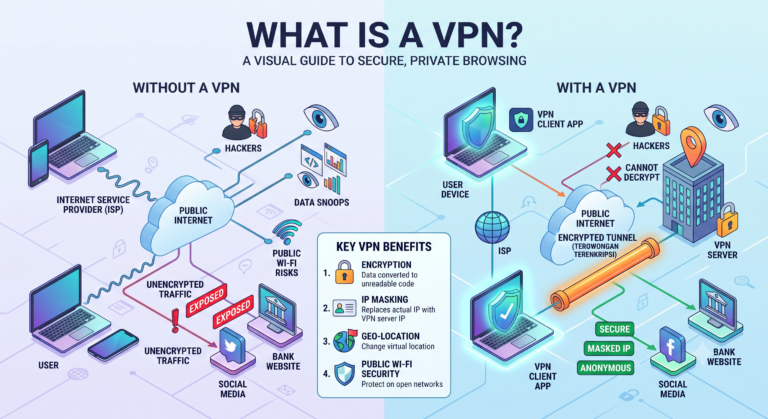
Encryption is the foundation of what a VPN actually does, so it’s worth confirming before anything else. Look for providers using AES-256 encryption, which is the current industry standard and is also used by banks and government agencies. Some providers highlight AES-128 as a lighter, faster alternative, which is still considered secure but offers a smaller margin of theoretical protection.
Avoid any VPN still relying primarily on older, weaker encryption methods or protocols with known vulnerabilities, since this indicates the service hasn’t kept pace with current security practices.
Compare VPN Protocols
The protocol determines how your data travels through the encrypted tunnel, and it directly affects both speed and security. A few to look for:
- WireGuard — a newer, lightweight protocol known for fast connection speeds and efficient performance, increasingly considered the modern standard.
- OpenVPN — open-source and extensively audited by independent security researchers, offering a strong balance of speed and reliability.
- IKEv2/IPSec — particularly useful on mobile devices, since it reconnects quickly when switching between Wi-Fi and cellular networks.
A trustworthy VPN typically offers a choice between at least two of these, letting you prioritize speed or stability depending on your situation. Be cautious of providers still defaulting to outdated protocols like PPTP, which has known security weaknesses.
Look for a verified no-logs policy.
A no-logs policy means the provider doesn’t record your browsing activity, connection timestamps, or originating IP address. This matters because a provider can’t disclose data it never collected in the first place, whether through a legal request or a data breach.
The word “verified” is doing important work here. Plenty of VPNs claim a no-logs policy in their marketing, but the ones worth trusting have submitted to independent third-party audits confirming those claims hold up under scrutiny. If a provider’s privacy policy is vague, hard to find, or contradicts its own marketing language, treat that as a legitimate warning sign rather than a minor detail.
Confirm It Includes a Kill Switch and DNS Leak Protection
These two features often get overlooked in comparison charts, but they matter more than they might seem.
A kill switch automatically cuts your device’s internet connection if the VPN tunnel drops unexpectedly, preventing your unencrypted traffic and real IP address from being exposed without warning. Without one, a brief connection drop could quietly undo the entire privacy benefit you signed up for.
DNS leak protection ensures that requests to translate website addresses are routed through the VPN’s encrypted tunnel rather than defaulting to your ISP’s DNS servers. A DNS leak can expose which sites you’re visiting even while the VPN otherwise appears connected and functional.
Evaluate Server Locations and Network Size
The number and spread of server locations affects both speed and flexibility. More servers generally mean less congestion per server, which can translate into more consistent speeds, especially during peak usage hours.
If you need to access content or services tied to a specific country, confirm the provider actually has servers there rather than assuming broad global coverage. Some providers list countries prominently but have very few actual server locations within them, which can affect both speed and reliability.
Test Real-World Speed and Performance
Encryption inevitably introduces some overhead, but the impact varies significantly between providers based on server quality, protocol efficiency, and network infrastructure. Since marketing claims about speed are hard to verify in advance, most reputable VPNs offer either a free trial or a money-back guarantee period, which is worth using to test actual performance on your own devices and networks before committing long-term.
Pay attention to how the connection performs specifically on the networks you use most, whether that’s home Wi-Fi, a work network, or mobile data, since performance can vary meaningfully between them.
Consider Device Compatibility and Simultaneous Connections
Check whether the VPN supports every device you actually use — desktop, mobile, and any router-level configuration if you want whole-network protection. Also check the number of simultaneous connections allowed under a single subscription, since households or small teams often need multiple devices connected at once without purchasing separate plans.
Weigh the Cost Against What You’re Actually Getting
Price alone isn’t a reliable indicator of quality in either direction. A higher price doesn’t guarantee stronger security, and an unusually cheap or free option often reflects a compromise somewhere, whether that’s weaker encryption, data logging, or limited server infrastructure.
Instead of comparing price in isolation, weigh it against the specific features that matter for your use case: verified no-logs policies, modern protocol support, kill switch functionality, and adequate server coverage. A slightly higher-priced provider with all of these solidly in place is typically a better long-term value than a cheaper one missing several.
Read Independent Reviews, Not Just Provider Claims
Provider websites are, understandably, not neutral sources for evaluating their own security claims. Independent reviews, security audits, and reporting from established technology publications tend to offer a more balanced view, particularly around real-world speed tests, past security incidents, and how a company has responded to any privacy controversies.
Frequently Asked Questions
Is the most expensive VPN always the most secure?
Not necessarily. Price doesn’t always correlate directly with security strength; it’s more important to verify specific features like encryption standards and audited no-log policies.
How many VPN protocols should a good provider offer?
At least two, typically including a modern option like WireGuard or OpenVPN, giving you flexibility depending on whether speed or stability matters more for a given situation.
Do I need a VPN with servers in every country?
Not usually. What matters more is whether the provider has reliable servers in the specific countries or regions you actually need to access.
Should I choose a VPN based on speed alone?
No. Speed matters, but a fast VPN with weak encryption or an unverified logging policy isn’t a safer choice just because it performs quickly.
Can I switch VPN providers easily if I’m not satisfied?
Yes, in most cases. Since VPNs typically don’t require long-term hardware or account migration, switching providers is usually straightforward, especially during introductory trial periods.
Do free VPNs ever meet these criteria?
Occasionally, though free tiers from otherwise reputable paid providers tend to be more trustworthy than standalone free-only services, which often rely on less transparent revenue models.
How often should I re-evaluate my VPN choice?
It’s reasonable to reassess annually or whenever a provider has a reported security incident, since encryption standards and company practices can change over time.
Conclusion
Choosing the right VPN isn’t about finding the one with the flashiest marketing or the longest server list — it’s about matching specific, verifiable features to your actual needs. Strong encryption, a modern protocol, a genuinely audited no-logs policy, and safeguards like a kill switch and DNS leak protection form the foundation of a trustworthy choice. Everything else, from price to server count, matters only once those fundamentals are already in place.