What Is a VPN? A Plain-English Guide to Virtual Private Networks
If you’ve ever connected to public Wi-Fi at a coffee shop and felt a small pang of worry about who else might be watching your traffic, you’ve already brushed up against the exact problem a VPN was built to solve. The term gets thrown around constantly in ads, tech reviews, and privacy discussions, but a surprising number of people use one without fully understanding what it actually does under the hood.
This guide breaks down what a VPN is, how it works, and when you genuinely need one — without the marketing fluff.
VPN Meaning: The Basic Definition
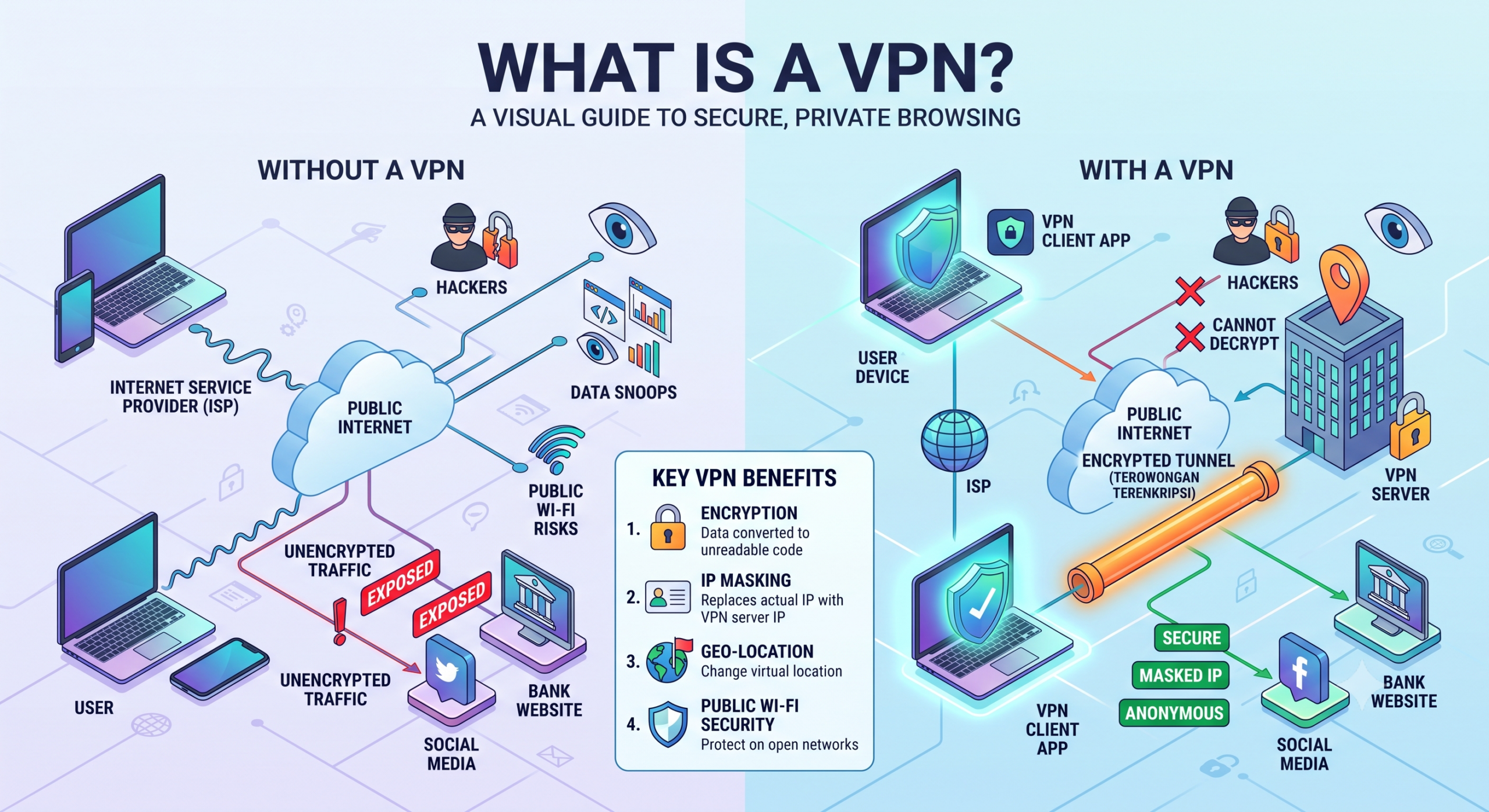
VPN stands for Virtual Private Network. At its core, it’s a service that creates an encrypted tunnel between your device and the internet, routing your traffic through a remote server operated by the VPN provider instead of going directly through your internet service provider (ISP).
Think of your regular internet connection like sending a postcard: anyone who handles it along the way — your ISP, network administrators, or someone snooping on the same Wi-Fi — can read what’s written on it. A VPN puts that message in a sealed, tamper-proof envelope and reroutes it through a private courier before it reaches its destination. The content is hidden, and the final recipient sees the courier’s address rather than yours.
That’s the plain-language version. Technically, a VPN masks your real IP address, encrypts the data leaving your device, and makes it far harder for third parties to see what you’re doing online or where you’re doing it from.
How Does a VPN Actually Work?
When you turn on a VPN, your device establishes a connection to a VPN server. Before any data leaves your device, it’s encrypted using a VPN protocol — a set of rules that governs how the secure tunnel is built and maintained.
The process generally looks like this:
- You connect to the VPN app or client on your device.
- The app encrypts your outgoing data and sends it through a secure tunnel to a VPN server.
- The VPN server decrypts the data and forwards your request to the website or service you’re trying to reach.
- The response travels back through the same encrypted tunnel to your device.
To anyone monitoring the connection—your ISP, a hacker on public Wi-Fi, or a network administrator—all they see is scrambled, encrypted traffic heading to a VPN server. They can’t see the actual websites you visit or the data you send.
Encryption: The Backbone of VPN Security
Encryption is what makes this tunnel meaningful rather than just a rerouting trick. Most reputable VPNs use AES-256 encryption, a standard also used by banks and government agencies, to scramble data into a format that’s computationally impractical to break without the correct decryption key. Without strong encryption, a “VPN” is really just a proxy with none of the security benefits.
What Are VPN Protocols, and Why Do They Matter?
The protocol is essentially the engine of the VPN — it determines how fast, stable, and secure your connection will be. Some of the most common ones include:
- OpenVPN — an open-source protocol known for a strong balance of security and speed, widely trusted by security researchers because its code can be publicly audited.
- WireGuard — a newer, lightweight protocol designed for faster connection speeds and simpler code, which reduces the potential for security flaws.
- IKEv2/IPSec — often used on mobile devices because it reconnects quickly when switching between Wi-Fi and cellular data.
- L2TP/IPSec — an older protocol, generally considered less efficient than newer alternatives but still found in some legacy systems.
Most consumer VPN apps let you choose a protocol in the settings, though many default to whichever option offers the best mix of speed and security for your device.
Why Do People Use a VPN?
The reasons vary, but they tend to fall into a few clear categories.
Privacy from your ISP and network operators. Without a VPN, your internet provider can see which websites you visit, even if it can’t see the specific content on encrypted (HTTPS) pages. A VPN hides this browsing pattern from your ISP entirely.
Security on public Wi-Fi. Open networks at airports, cafes, and hotels are common targets for attackers looking to intercept unencrypted traffic. A VPN’s encryption makes this kind of interception far less useful to an attacker.
Bypassing geographic content restrictions. Streaming services and websites often limit content based on location. Connecting to a VPN server in a different country can make it appear as though you’re browsing from there.
Avoiding price discrimination and tracking. Some websites adjust pricing or content based on location data tied to your IP address. A VPN can help reduce this kind of location-based profiling.
Remote access to work networks. Many businesses use VPNs to let employees securely connect to internal company systems from outside the office, which is a slightly different but related use case built on the same underlying technology.
What a VPN Does Not Do
It’s worth being upfront about the limits, since VPN marketing often overstates what the technology can achieve.
A VPN does not make you anonymous online. Websites can still track you through cookies, browser fingerprinting, and account logins, regardless of whether your IP address is masked. It also doesn’t protect you from malware, phishing attacks, or scams—those require separate tools like antivirus software and safe browsing habits. And a VPN doesn’t inherently make a weak password or unsecured account any safer; encryption on the network layer doesn’t fix vulnerabilities elsewhere.
Understanding these boundaries helps set realistic expectations rather than treating a VPN as a cybersecurity cure-all.
Free vs. Paid VPNs: What’s the Real Difference?
Free VPNs are tempting, but they often come with trade-offs that aren’t obvious at first glance. Running VPN servers is expensive, so free services need to make money somehow — sometimes through data logging, ad injection, slower speeds, or data caps that make everyday use frustrating.
Paid VPNs typically offer:
- No-logs policies (verified through independent audits, in the case of more transparent providers)
- Faster, more stable server networks
- A wider selection of server locations
- Dedicated customer support
- Additional features like kill switches, which cut your internet connection if the VPN drops, preventing unencrypted data from leaking out
If privacy is the primary reason you want a VPN, a reputable paid service with a transparent, audited privacy policy is generally a safer choice than a free one with vague terms.
How to Choose a VPN That Fits Your Needs
Not everyone needs the same features from a VPN. Someone streaming content abroad has different priorities than someone using public Wi-Fi at a business conference. A few practical things worth checking before choosing a provider:
- Does it have a clearly stated, independently audited no-logs policy?
- Which protocols does it support, and are they modern ones like WireGuard or OpenVPN?
- Is there a kill switch feature to prevent data leaks if the connection drops?
- How many server locations does it offer, and are they in the regions you actually need?
- Does the pricing model match your budget for long-term use, since VPNs are most useful as an ongoing habit rather than a one-time tool?
Frequently Asked Questions
Is using a VPN legal?
In most countries, including the United States, using a VPN is completely legal. Some countries with strict internet censorship laws do restrict or ban VPN use, so it’s worth checking local regulations if you’re traveling.
Can a VPN slow down my internet connection?
Yes, to some degree. Encrypting and rerouting traffic through a remote server adds a small amount of overhead, though modern protocols like WireGuard are designed to minimize this impact.
Does a VPN protect me from viruses and hackers?
Not directly. A VPN encrypts your connection and hides your IP address, but it doesn’t scan for malware or block phishing attempts. Those require dedicated security software.
Can my employer or school see what I do on a VPN?
If you’re using a personal VPN on a personal device and personal network, generally no. However, if you’re on a company-managed device or network, other monitoring tools may still be in place independent of the VPN.
Do I need a VPN on my phone as well as my computer?
Yes, if privacy and security are your goals. Mobile devices connect to public Wi-Fi and cellular networks just as often as computers, so the same risks apply.
Will a VPN let me access any streaming content from any country?
Not always. Many streaming platforms actively detect and block known VPN server IP addresses, so results can vary by provider and service.
What’s the difference between a VPN and a proxy?
A proxy reroutes your traffic but usually doesn’t encrypt it, offering far weaker privacy protection than a VPN, which encrypts data end-to-end through the tunnel.
Conclusion
A VPN isn’t a magic privacy switch, but it is a genuinely useful tool for encrypting your traffic, masking your IP address, and reducing what your ISP and network operators can see. Understanding what it actually does—and doesn’t do—makes it much easier to decide whether one fits into your daily digital habits and which features actually matter when you’re comparing providers.