VPN vs Proxy: What’s the Difference and Which One Do You Need?
Both tools promise to hide your IP address and let you browse as though you’re somewhere else, so it’s easy to assume a VPN and a proxy are just two names for the same thing. They’re not. The difference matters quite a bit depending on whether you’re trying to protect sensitive data or just want to unblock a website for a few minutes.
Here’s a clear comparison of how each one actually works, where they overlap, and which one makes sense for different situations.
Quick Answer: The Core Difference
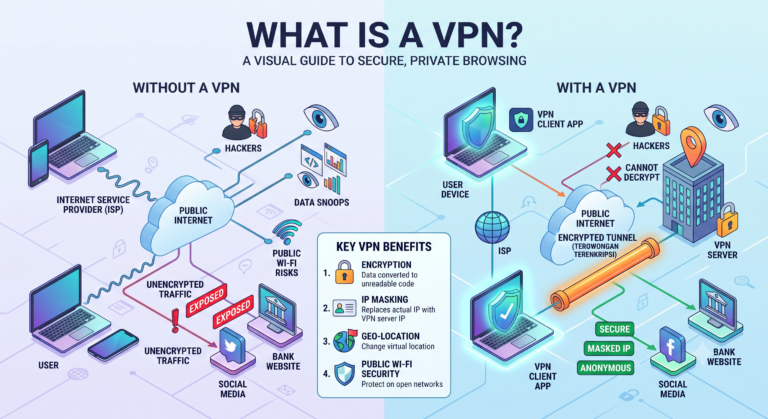
A VPN encrypts all of your device’s internet traffic and routes it through a secure tunnel to a remote server. A proxy simply reroutes traffic for a specific app or browser through an intermediary server, typically without encrypting it.
That single distinction — encryption versus no encryption — explains almost every other difference between the two, from security to speed to how much trust you’re placing in the provider.
How a VPN Works
A VPN operates at the operating system level, meaning once it’s active, it redirects and encrypts traffic from your entire device—every browser tab, background app, and connected service—not just the one you’re currently using.
When you connect to a VPN, your device and the VPN server go through a handshake process to establish an encrypted tunnel, typically using a protocol like OpenVPN, WireGuard, or IKEv2. Your data is then encrypted, usually with AES-256, before it ever leaves your device. It travels through the tunnel to the VPN server, which decrypts it and forwards your request to its destination, masking your real IP address in the process.
Because this encryption applies system-wide, a VPN protects everything from your web browsing to app traffic to background data syncing, which is one of its biggest practical advantages.
How a Proxy Works
A proxy server acts as a middleman for a specific connection, usually configured at the browser or application level rather than the whole device. When you route your traffic through a proxy, your requests go to the proxy server first, which then forwards them to the destination website using its own IP address instead of yours.
The key difference is that most proxies don’t encrypt your traffic. They reroute it and mask your IP address for that specific connection, but the data itself typically remains readable to anyone intercepting it along the way — your ISP, network administrator, or an attacker on the same network.
There are a few common types of proxies worth knowing:
- HTTP proxies — handle only web traffic and are often used for basic browsing or bypassing simple content filters.
- SOCKS proxies — more flexible, capable of handling various types of traffic beyond just web browsing, but still generally unencrypted.
- Transparent proxies — often used by workplaces or schools to monitor and filter traffic without necessarily hiding the user’s identity at all.
VPN vs Proxy: Side-by-Side Comparison
| Feature | VPN | Proxy |
|---|---|---|
| Encryption | Yes, typically AES-256 | Usually none |
| Coverage | Entire device, all apps | Single app or browser only |
| IP masking | Yes | Yes |
| Speed impact | Slight, due to encryption overhead | Often minimal, since there’s no encryption |
| Security on public Wi-Fi | Strong protection | Little to no protection |
| Common use case | Privacy, security, remote work | Quick geo-unblocking, basic browsing |
| Setup level | App-based, device-wide | Often manual, per-app configuration |
When a Proxy Might Be Enough
A proxy can be a reasonable, lightweight option for low-stakes situations where encryption isn’t the priority. If you just need to quickly check how a website appears from a different country, or you’re bypassing a basic content filter for non-sensitive browsing, a proxy can get the job done without the overhead of a full VPN connection.
Proxies are also sometimes faster for these narrow use cases specifically because they skip the encryption step, which means there’s less processing overhead involved in each request.
When You Actually Need a VPN Instead
A proxy falls short the moment security becomes a real concern rather than a convenience issue. If you’re connecting to public Wi-Fi at an airport or coffee shop, handling sensitive logins, accessing banking apps, or working remotely with company data, the lack of encryption in a typical proxy leaves your traffic exposed to anyone monitoring that same network.
A VPN’s encrypted tunnel is specifically designed to prevent this kind of interception. It also protects your entire device rather than just the app you’ve configured, which matters if you’re running multiple apps that all handle sensitive data simultaneously—something a single-app proxy configuration simply won’t cover.
Can You Use a VPN and Proxy Together?
Technically, yes, though it’s not common for most everyday users. Some advanced setups layer a proxy on top of a VPN connection for specific routing needs, such as accessing region-specific content while maintaining the VPN’s overall encryption for the rest of the device’s traffic. For most people, though, this adds complexity without a meaningful security benefit, and running a properly configured VPN alone covers the vast majority of practical needs.
Which One Should You Actually Choose?
The right choice depends less on habit and more on what you’re trying to protect.
Choose a VPN if you regularly use public Wi-Fi, handle sensitive information like banking or work logins, care about hiding your browsing activity from your ISP, or want consistent protection across your entire device without reconfiguring settings for each app.
Choose a proxy only if you need a quick, low-stakes way to appear as though you’re browsing from a different location for something like checking region-locked pricing or content, and you’re not handling anything sensitive during that session.
For most people prioritizing genuine privacy and security rather than a quick workaround, a reputable VPN is the more reliable long-term choice.
Frequently Asked Questions
Is a proxy safer than not using anything at all?
It can mask your IP address for a specific connection, but without encryption, it doesn’t meaningfully protect your data from interception the way a VPN does.
Why do proxies tend to be faster than VPNs?
Proxies skip the encryption and decryption process, which reduces processing overhead, though this comes at the cost of significantly weaker security.
Can websites tell the difference between VPN and proxy traffic?
Some websites use detection methods that can identify traffic from known VPN or proxy server IP addresses, regardless of which technology is being used.
Do free proxies come with the same risks as free VPNs?
Often more so. Free proxies typically have fewer privacy safeguards, and since traffic isn’t encrypted, operators can more easily view unprotected data passing through their servers.
Is a VPN overkill for just watching geo-blocked videos?
Not necessarily. Many people use VPNs specifically for this purpose, and the added encryption doesn’t meaningfully hurt the experience for most modern, efficient protocols.
Does a proxy protect against malware or phishing?
No. Proxies only reroute traffic and mask IP addresses; they don’t scan for malicious content, which requires separate security software.
Can my employer tell if I’m using a proxy instead of a VPN?
On a company-managed network, network administrators can often detect unusual traffic patterns from either a proxy or VPN, depending on their monitoring tools and policies.
Conclusion
The choice between a VPN and a proxy really comes down to one question: are you trying to protect sensitive data, or just quickly change how your traffic appears to a single website? A proxy handles the second scenario well enough, but its lack of encryption makes it a poor fit for anything involving real privacy or security. A VPN, with its encrypted, device-wide protection, is the more dependable option whenever the stakes are higher than casual convenience.