Is a VPN Safe to Use? A Realistic Look at the Risks and Protections
Ask ten people whether a VPN is safe, and you’ll probably get ten confident but slightly different answers—some treating it like digital body armor, others suspicious it’s a data-harvesting trap in disguise. The honest answer sits between those extremes: a VPN’s safety depends almost entirely on which one you use, how it’s configured, and what you’re expecting it to protect you from.
This article breaks down the real risks, the genuine protections, and how to tell a trustworthy VPN from a risky one.
The Short Answer: Yes, But With Conditions
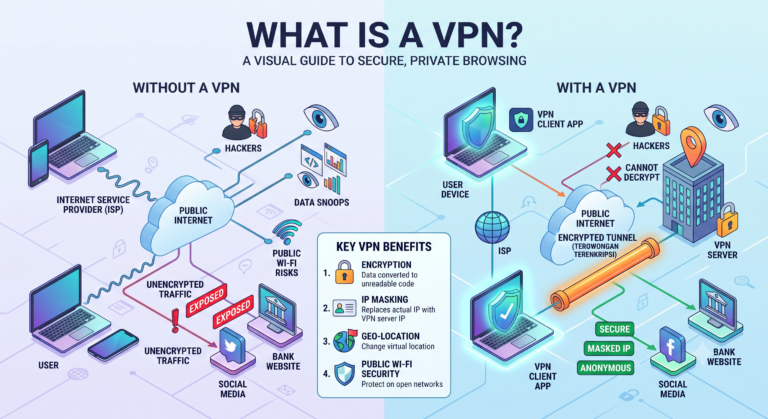
A reputable VPN, properly configured, is generally safe to use and can meaningfully improve your privacy and security online. It encrypts your internet traffic, hides your IP address from websites you visit, and protects your data from interception on unsecured networks like public Wi-Fi.
The safety concern isn’t really about VPN technology itself — protocols like OpenVPN and WireGuard, combined with AES-256 encryption, are well-tested and considered secure by the cybersecurity community. The risk comes from the provider running the service and from misunderstandings about what a VPN can and can’t do.
What Makes a VPN Genuinely Safe
A few technical and business factors separate a trustworthy VPN from a questionable one.
Strong encryption standards. Look for AES-256 encryption paired with a modern protocol like WireGuard or OpenVPN. These combinations are widely vetted by independent security researchers and have no known practical vulnerabilities when implemented correctly.
A verified no-logs policy. A VPN provider that doesn’t collect or store records of your browsing activity, connection timestamps, or IP addresses can’t hand that data over even if compelled to, because it simply doesn’t exist. The word “verified” matters here—some providers claim a no-logs policy but haven’t submitted to independent audits to confirm it.
A working kill switch. This feature cuts your device’s internet connection if the VPN tunnel drops unexpectedly, preventing your real IP address and unencrypted traffic from being exposed without your knowledge.
DNS leak protection. Some VPNs fail to route DNS requests through the encrypted tunnel, leaking information about which websites you’re visiting even while the VPN appears connected. A safe VPN handles DNS requests internally rather than defaulting to your ISP’s servers.
Transparent jurisdiction and ownership. Where a VPN company is legally based affects what data-sharing agreements or government requests it may be subject to. Reputable providers are upfront about this rather than obscuring who owns and operates the service.
Where the Real Risks Come From
Free VPNs with unclear business models. Running VPN server infrastructure costs money, so a free service needs revenue from somewhere. In some cases, this has meant logging and selling user data, injecting ads into browsing sessions, or offering weaker encryption to cut costs. Not every free VPN behaves this way, but the incentive structure makes it worth extra scrutiny.
Providers with vague or contradictory privacy policies. If a privacy policy is difficult to find, written in vague terms, or contradicts what the provider claims in marketing, that’s a legitimate red flag rather than a technicality to skip past.
Outdated protocols. Older protocols like PPTP have known security weaknesses and are no longer considered safe by current standards. A VPN still relying on outdated protocols as its main option is a sign the service hasn’t kept pace with modern security practices.
Malware bundled with VPN apps. In rare cases, unofficial or pirated VPN apps — particularly outside official app stores — have been found bundled with malicious software. Downloading VPN apps only from official stores or the provider’s verified website substantially reduces this risk.
What a VPN Doesn’t Protect You From
Part of using a VPN safely is understanding its limits, since overestimating what it does can create a false sense of security.
A VPN doesn’t protect against phishing emails, malicious downloads, or scam websites—those require separate tools like antivirus software and cautious browsing habits. It also doesn’t make you anonymous; websites can still track you through cookies, browser fingerprinting, and account logins regardless of your IP address being masked. And a VPN can’t fix a weak or reused password, which remains one of the most common ways accounts get compromised, independent of network-level encryption.
Recognizing these boundaries doesn’t make a VPN less useful — it just means pairing it with other basic security habits rather than treating it as a single fix for everything.
Is It Safe to Use a VPN on Public Wi-Fi?
This is actually one of the safest and most justified everyday uses of a VPN. Public networks in airports, hotels, and coffee shops are often unencrypted or poorly secured, making it easier for someone on the same network to intercept unprotected traffic.
A VPN encrypts your data before it leaves your device, meaning that even if someone is monitoring that same public network, your traffic appears as unreadable, encrypted noise. This is one of the clearer cases where VPN use adds a real, tangible security benefit rather than a marginal one.
Is It Safe to Use a VPN for Everyday Browsing?
Yes, for most people, everyday VPN use is safe as long as the provider is reputable. There’s no inherent danger in keeping a VPN active while browsing, streaming, or working, and doing so consistently—rather than turning it on only occasionally—provides more consistent privacy benefits.
The main practical trade-off is a small amount of speed reduction, since your traffic is being encrypted and routed through an additional server. For most modern VPNs using efficient protocols like WireGuard, this impact is usually minor.
How to Check If a VPN Is Trustworthy Before You Use It
Before committing to a provider, a few checks can help confirm it’s safe to rely on:
- Look for a clearly published, independently audited no-logs policy.
- Confirm it uses AES-256 encryption with a modern protocol like WireGuard or OpenVPN.
- Check for a kill switch and built-in DNS leak protection.
- Research the company’s history, ownership, and jurisdiction.
- Read recent, independent reviews rather than relying solely on the provider’s own marketing claims.
- Avoid apps from unofficial third-party sources, even if they claim to offer “premium” features for free.
Frequently Asked Questions
Can a VPN provider see my browsing activity?
Technically, yes — your traffic passes through their servers, which is why a verified no-logs policy matters. A trustworthy provider is structured so it doesn’t retain that data even though it temporarily handles it.
Are free VPNs dangerous to use?
Not automatically, but many free VPNs generate revenue through data collection or advertising, so it’s worth reading their privacy policy closely before relying on one for sensitive activity.
Can using a VPN get you in legal trouble?
In most countries, including the United States, using a VPN is legal. Some countries with strict censorship laws restrict VPN use, so it’s worth checking local regulations if you’re traveling internationally.
Does a VPN protect me from hackers?
It protects your data in transit through encryption, which helps against interception on unsecured networks. It doesn’t block malware or phishing attempts, which require separate security tools.
Is it safe to leave a VPN connected all the time?
Yes, for most reputable providers. Staying connected consistently generally improves privacy protection rather than creating any additional risk.
Can a VPN protect my mobile banking app?
A VPN adds a layer of encryption to your connection, which can help on unsecured networks, but your banking app’s own security measures remain the primary layer of protection for that specific traffic.
How do I know if my VPN is actually working?
You can check for IP address leaks and DNS leaks using independent online testing tools, which confirm whether your real location and DNS requests are being properly routed through the VPN’s encrypted tunnel.
Conclusion
A VPN is safe to use when it comes from a reputable provider with strong encryption, a verified no-logs policy, and modern protocol support — and when you understand what it actually protects against. The real safety concerns tend to come from the provider’s business practices and transparency, not from VPN technology itself. Choosing carefully, checking for the right security features, and pairing a VPN with sound overall digital habits is what actually determines whether it keeps you safer online.