How Does a VPN Work? A Step-by-Step Breakdown of the Technology
Turning on a VPN takes about two seconds — tap a button, wait for the little “connected” checkmark, and you’re supposedly protected. But almost nobody stops to ask what’s happening in that two-second window. A lot is, actually, and understanding the mechanics behind it makes it much easier to judge whether a VPN is doing its job properly or just giving you a false sense of security.
This article walks through the actual process step by step: what happens when you connect, how your data gets encrypted, and why certain protocols matter more than others.
Step 1: Your Device Initiates a Connection Request
The moment you open a VPN app and hit “connect,” your device sends a connection request to a VPN server, usually one you’ve selected by location or one chosen automatically for speed. This request isn’t sent in plain form — it’s the starting point of what’s called a handshake, a negotiation process where your device and the server agree on how they’re going to communicate securely.
During this handshake, both sides exchange information needed to build an encrypted tunnel: which protocol to use, which encryption keys to generate, and how to verify that each side is who it claims to be. This authentication step matters because it prevents a third party from impersonating either the VPN server or your device.
Step 2: A Secure Tunnel Is Established
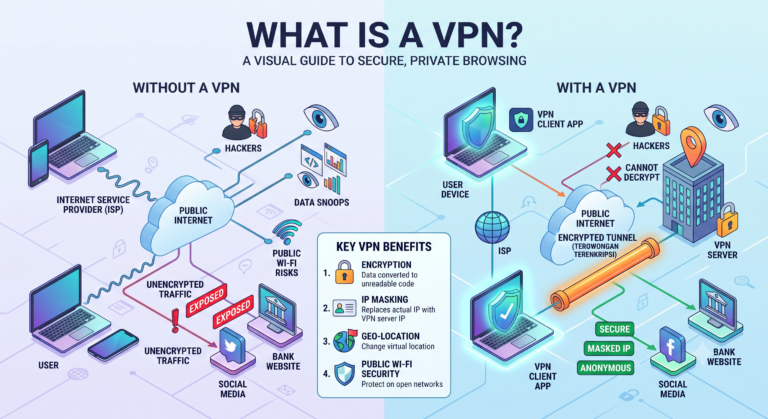
Once the handshake completes, your device and the VPN server build what’s commonly called a VPN tunnel. This isn’t a physical pathway — it’s a logical, encrypted channel layered on top of your normal internet connection.
The tunnel is created using a VPN protocol, which is essentially the rulebook governing how data is packaged, encrypted, and transmitted. Different protocols handle this in different ways:
- OpenVPN wraps data in an additional layer of encryption and is widely used because its open-source code has been extensively reviewed by security researchers.
- WireGuard uses a leaner, more modern codebase, which tends to result in faster connection speeds and quicker reconnections.
- IKEv2/IPSec is built to handle network switches smoothly, which is why it’s common on mobile devices moving between Wi-Fi and cellular data.
Whichever protocol is used, the outcome is the same: a private channel through which your data can travel without being readable by anyone outside the tunnel.
Step 3: Your Data Gets Encrypted Before It Leaves Your Device
This is the part that actually protects you. Before any of your browsing traffic — a webpage request, a file download, a login form — leaves your device, it’s encrypted using a cipher such as AES-256, the same encryption standard used by financial institutions and government agencies.
Encryption converts your readable data into scrambled ciphertext that can only be reversed with the correct decryption key, which is held by the VPN server. Practically speaking, this means if someone intercepted your traffic at this stage — on public Wi-Fi, for instance — they’d see meaningless encrypted noise instead of your actual activity.
This is also the stage where a concept called encapsulation comes into play. Your original data packet gets wrapped inside another packet for transmission through the tunnel, then unwrapped at the other end. It’s a bit like putting a sealed letter inside a second envelope addressed to a trusted intermediary, who then forwards the original letter once it’s safely received.
Step 4: The VPN Server Decrypts and Forwards Your Request
When your encrypted data reaches the VPN server, the server decrypts it and forwards the request to its actual destination — a website, an app’s backend, or another online service. From the destination’s point of view, the request appears to originate from the VPN server’s IP address, not your own.
This is the mechanism behind IP masking. The website you’re visiting sees the server’s location and identity, not yours, which is why VPNs are commonly used to appear as though browsing from a different city or country.
Step 5: The Response Travels Back Through the Same Tunnel
Once the destination server responds, that response doesn’t go directly back to you. It’s routed back to the VPN server first, encrypted again, and sent through the same secure tunnel to your device, where it’s decrypted and displayed as a normal webpage or app response.
To you, this entire round trip feels instantaneous. Under the hood, though, your data has been encrypted, encapsulated, decrypted, forwarded, and returned — all through a process that repeats continuously for as long as you stay connected.
What Happens If the VPN Connection Drops?
A dropped VPN connection is one of the more overlooked risks of the technology. If the encrypted tunnel fails without any safeguard in place, your device may automatically fall back to your regular, unencrypted internet connection — meaning your real IP address and unprotected traffic become visible again, often without any obvious warning.
This is why a kill switch feature matters. A kill switch monitors the VPN connection and immediately cuts off your device’s internet access if the tunnel drops, preventing any data from leaking out unencrypted until the VPN reconnects. Not all VPN services include this feature by default, so it’s worth checking for it specifically if uninterrupted privacy matters to you.
Does a VPN Affect DNS Requests Too?
Yes, and this is a detail many people miss. Every time you type a website address, your device sends a DNS (Domain Name System) request to translate that address into an IP number the internet can route to. Without proper VPN configuration, this DNS request can sometimes bypass the encrypted tunnel entirely — a problem known as a DNS leak.
Reputable VPN providers route DNS requests through their own encrypted servers rather than your ISP’s default DNS servers, closing this gap. If a VPN doesn’t handle DNS requests securely, it can undermine much of the privacy benefit the encryption was supposed to provide.
Why Speed Can Vary Depending on How a VPN Works
Because your data is being encrypted, encapsulated, routed through an additional server, and then decrypted again, some amount of latency is unavoidable. How noticeable this is depends on a few factors:
- The distance between you and the VPN server (closer servers generally mean less delay)
- The protocol in use, since lighter protocols like WireGuard tend to introduce less overhead
- The server’s current load, as popular servers handling heavy traffic may respond more slowly
- Your baseline internet speed, since a VPN can’t make a slow connection fast, only add its own layer on top of it
Understanding this trade-off helps set realistic expectations — a VPN adds a genuine security process, not an invisible one, so some performance impact is normal.
Frequently Asked Questions
Does a VPN work the same way on every device?
The underlying process — tunneling, encryption, and encapsulation — is consistent, but the specific protocol and app implementation can vary between desktop, mobile, and router-based VPN setups.
Can a VPN work without an app installed?
Yes. Some VPNs can be configured directly through a device’s or router’s network settings using protocols like IKEv2 or OpenVPN, without needing a dedicated application.
Why does my VPN sometimes disconnect randomly?
This can happen due to network switches, server overload, or unstable internet connections. A kill switch feature helps prevent data exposure during these drops.
Does a VPN work differently for streaming versus browsing?
Not fundamentally — the encryption and tunneling process is the same. However, streaming platforms may specifically detect and block known VPN server IP addresses, which is separate from how the VPN technology itself functions.
Is the VPN handshake process the same for every protocol?
No. Each protocol negotiates the handshake slightly differently, which is why connection speed and reliability can vary between OpenVPN, WireGuard, and IKEv2.
Can two people using the same VPN server see each other’s data?
No. Each user’s traffic is encrypted individually and kept separate through the tunneling process, so other users on the same server cannot see your data.
Does turning off a VPN immediately expose my previous activity?
No. Once your session data has already been transmitted and received, disconnecting the VPN doesn’t retroactively expose past traffic — it only means new traffic will no longer be encrypted or rerouted.
Conclusion
Behind that simple “connect” button is a genuinely intricate process: a handshake to establish trust, an encrypted tunnel to protect your data, encapsulation to package it securely, and a remote server that masks your identity while forwarding your requests. Understanding each of these steps makes it far easier to evaluate whether a VPN is actually protecting you the way it should — and to spot the gaps, like DNS leaks or missing kill switches, that can quietly undermine that protection.